Why should you buy online with us?
- You can shop anytime from your phone, tablet, or computer.
- Online shopping saves you time and money compared to visiting physical stores.
- Nyereka Tech offers a wide range of products, from simple parts to advanced electronics.
- Each product comes with detailed information, photos, and usage tips.
- Payments are safe and flexible, including Mobile Money and bank transfer.
- We deliver quickly and safely across East Africa.
- You can track your orders and view your purchase history online.
- Online customers get special discounts, bundles, and promotions.
- Easy returns and responsive support are available if something goes wrong.
- Shopping online helps you learn, build, and innovate with the tools you need.
- Start shopping online today!
Visit www.nyerekatech.com — browse, order, and get your products delivered wherever you are.
Smart. Fast. Secure. — That’s Nyereka Tech.
Now let’s see how it is done step by step.
- Accessing the Website
To start using Nyereka Tech’s online store, you can open your web browser and go directly to www.nyerekatech.com. Alternatively, you can access our website through our mobile app if you have it installed.
You can also visit the website using Google search: open Google, type nyerekatech.com, and the first option that appears in the search results will be our official website.


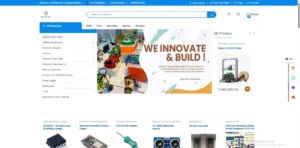
Once the website loads, you will see the homepage displaying different categories of products such as Arduino boards, sensors, IoT kits, and 3D printing services. And if you’re using smart phone you have to click on 3 line of Menu left above to see the categories From this page, you can browse through all available products, learn more about the company, and start shopping online.


2. Browsing Products
The homepage and menu display different categories so you can click on any category to see all the related products or use the search bar to find a specific item by name or keyword. For example, “Uno” or “sensor” that brings you all related products.

Each product page provides detailed information, including description, features and price. Browsing products carefully helps you choose exactly what you need before adding items to your cart.
3. Adding Items to Cart
After finding the product you want to buy, the next step is to add it to your shopping cart. On each product page, you’ll see a button labeled “Add to Cart.” Simply click it to include the item in your order.

A small pop-up or cart icon will confirm that your product has been successfully added. You can continue browsing and add more items or open your cart anytime by clicking the shopping cart symbol at the top of the page.

In the cart, you can review your selections, adjust quantities, or remove any items before proceeding to checkout. This step ensures you have everything you need before placing your final order.

4. Checkout & Payment
Once you’ve reviewed the items in your cart and you are ready to make your purchase, first click on Update cart above Proceed to checkout and then move to checkout. This is where you provide your delivery details and complete your payment.

At this step, you’ll be asked to log in if you already have an account. If not, you can simply insert your email address and click Send Verification Email to create one quickly You will then receive an email message that allows you to verify your address. Or click log in and continue with Google, here you’re requested to insert your google account and the password you and then continue placing your order.


After logging in or verifying your email, fill in your shipping address, contact information, and choose your preferred payment method. Nyereka Tech offers convenient options such as mobile money, or bank transfer, depending on your location.


You will also find an Order Notes box — this section is optional, but it’s useful if you want to leave special instructions for your delivery (for example, “Call before delivery”).

Before confirming, review your order summary carefully to make sure all products, quantities, and prices are correct. Once everything looks good, click on Place order. You’ll then receive an order confirmation email message with all your purchase details.


5. Delivery / Tracking
After you complete your payment, we’ll start preparing your order and send it for delivery step by step. Once we confirm your order, we’ll give you a purchase code that lets you track its progress. Just click Track Your Order, enter your Order ID and Email, then click Track.

When your order arrives, carefully check your package to confirm that all the items match what you ordered and are in good condition. If you notice any problems such as a missing or damaged item—contact Nyereka Tech’s customer service immediately for quick assistance or replacement.
- Tips & Best Practices
- Always check product availability and description carefully (specifications, version, compatibility).
- If shipping outside Rwanda or to remote areas, confirm delivery cost.
- Save login credentials securely and avoid using public computers for payment.
- For large or bulk orders (e.g., for schools, labs), contact Nyereka Tech ahead of time to confirm stock and shipping.
- If you are unfamiliar with a product (e.g., “Arduino Nano”, “IoT sensor”), ask for help or check the training resources offered by Nyereka Tech.