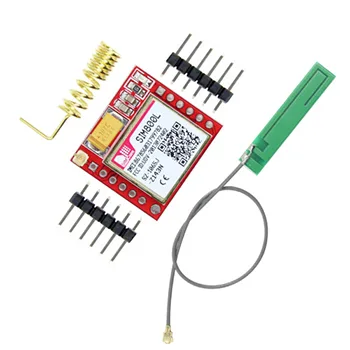
SIM800L is a miniature cellular module which allows for GPRS transmission, sending and receiving SMS and making and receiving voice calls.
The SIM800L module allows your microcontroller (like Arduino, ESP32, etc.) to connect to a GSM cellular network to send/receive SMS, make/receive calls, or connect to the internet via GPRS. It’s tiny in size, making it perfect for mobile or space-constrained applications.
Key Features
-
Ultra-compact and light weight
-
Supports SMS, voice, and GPRS data
-
Quad-band operation – usable worldwide
-
Low power consumption
-
Standard AT command set
-
Can be controlled by microcontrollers via UART
Pinout Overview
| Pin |
Function |
| VCC |
3.7V – 4.4V input (NOT 5V!) |
| GND |
Ground |
| TXD |
Transmit (to RX of MCU) |
| RXD |
Receive (to TX of MCU) |
| RST |
Reset (active LOW) |
| NET |
Network status LED pin |
How to Use (with Arduino)
Wiring Example (with Level Shifter or Voltage Divider):
-
SIM800L VCC → 4.0V power supply
-
SIM800L GND → GND
-
SIM800L TX → Arduino RX (through voltage divider)
-
SIM800L RX ← Arduino TX (through voltage divider)
-
SIM800L RST → optional, use for manual reset
Basic AT Commands:
Typical Applications
-
IoT devices (remote monitoring, telemetry)
-
SMS alert systems
-
GSM-based home automation
-
Location tracking (when combined with GPS)
-
Voice call–based controls
-
Low-cost remote sensors.
Steps to Send an SMS Using SIM800L and Arduino
1. Required Components
-
SIM800L GSM Module (with antenna)
-
Microcontroller (e.g., Arduino UNO/Nano)
-
External power source (4.0V–4.2V, 2A capable)
-
Level shifter or voltage divider (for TX/RX safety)
-
Active SIM card (with SMS balance)
2. Wiring Connection (Example with Arduino UNO)
| SIM800L Pin |
Arduino Pin |
Notes |
| VCC |
4.0V (external) |
Don’t connect to 5V — use a Li-ion battery or buck converter |
| GND |
GND |
Common ground with Arduino |
| TX |
D7 (Software RX) |
Connect via voltage divider (3.3V max input) |
| RX |
D8 (Software TX) |
Arduino TX should be lowered to 2.8–3.3V |
| RST |
Optional |
Pull LOW briefly to reset |
3. Arduino Code to Send SMS
This code uses SoftwareSerial to communicate with SIM800L:
4. What You Should See
-
Your serial monitor will show “SMS Sent”
-
The recipient will receive your text
-
SIM800L must have good signal (check with AT+CSQ)
-
SIM must not have PIN lock and should be inserted properly
Troubleshooting Tips
-
Use a dedicated 4.2V 2A power source (SIM800L draws up to 2A when transmitting).
-
Make sure the baud rate matches (SIM800L usually uses 9600).
-
Wait for network registration: AT+CREG? should return 0,1
-
If SMS not sent, check SIM card status with AT+CPIN?
if you want to see how to do it you can watch this shot video can be helpful for you.


There are no reviews yet.