


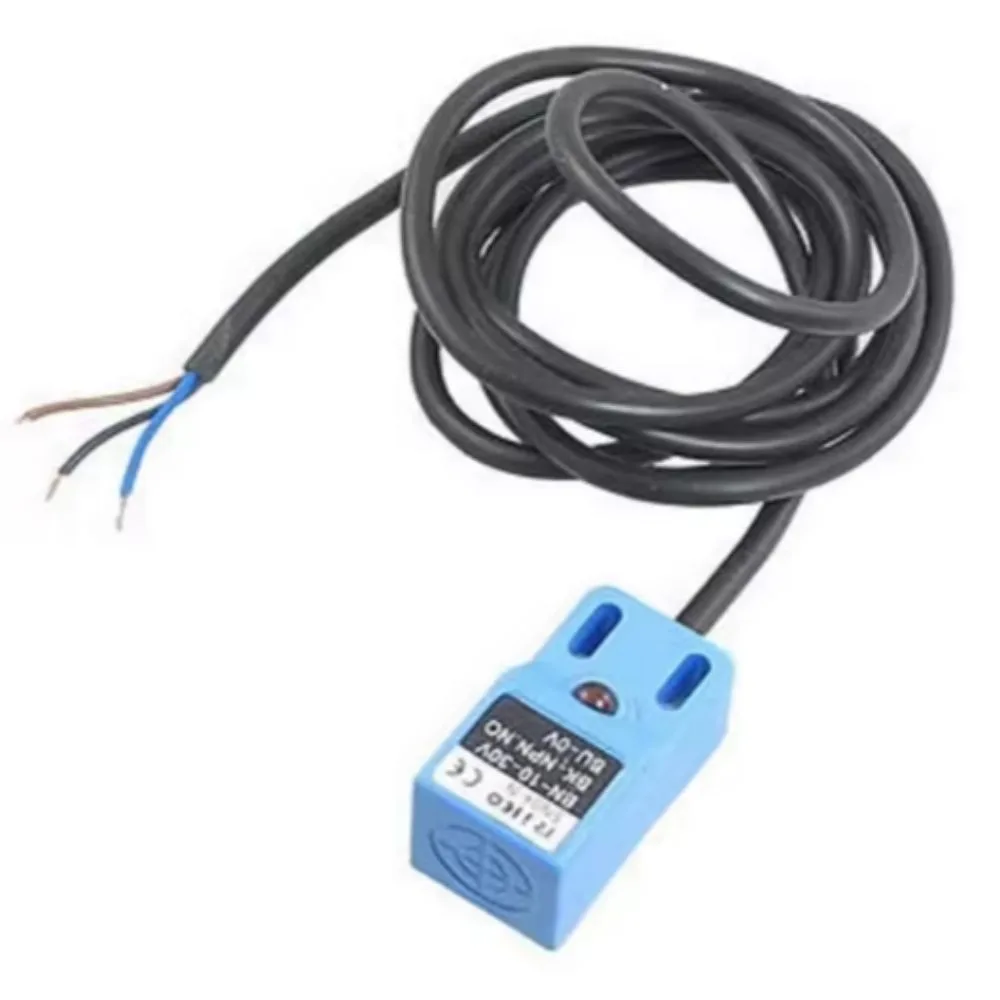
An inductive proximity sensor is a non-contact sensor that detects metallic (conductive) objects by generating an electromagnetic field and sensing changes when a metal object approaches. The SN04 (or SN04-N) is a commonly used type that is compact and inexpensive, widely used in CNC machines, 3D printers, robotics, automation, and general metal detection tasks.
The “NPN” designation refers to its output transistor type (inside the sensor) — in this case, NPN switching (often open-collector). Some variants are normally-open (NO), some are normally-closed (NC), or even NO/NC combinations depending on the model.
Because it is inductive, it cannot detect non-metallic objects (plastic, wood, water, etc.) — only metal. The “04” often refers to the detection distance of 4 mm.
A typical sensor SN04‑N Inductive Proximity Sensor (or equivalent) would be representative of this class.
Features
Here are the usual features you’ll find in SN04 (NPN) proximity sensors:
| Feature | Description |
|---|---|
| Sensing principle | Inductive — detects metal objects without contact |
| Detection distance / range | ~ 4 mm typical (sometimes 5 mm in some sources) |
| Output type | NPN (usually open-collector) — often Normally Open (NO) variant (i.e. output conducts when object present) |
| Supply voltage | ~ 6 to 36 V DC (or 10 to 30 V DC in some versions) |
| Load current / max output current | ~ 300 mA (typical) |
| Indicator LED | Many versions include an LED to show when detection is active |
| Response frequency / speed | Some versions specify e.g. 500 Hz (i.e. can detect objects switching up to 500 per second) |
| Housing / size | Compact block / rectangular style (e.g. 36×18×18 mm) |
| Wire / cable | 3-wire (Brown = V+, Blue = GND, Black = output) |
| Protection / environment | Many versions are IP67 rated (sealed against dust and water) |
These features make SN04 sensors useful for detecting the presence or absence of metal targets in automation systems, limit switches, object detection, and positioning tasks.
Typical Specifications
Here is a more precise typical spec sheet for an SN04-N sensor (NPN, NO) based on multiple sources:
| Spec | Typical Value |
|---|---|
| Model | SN04 / SN04-N |
| Detection distance | ~ 4 mm |
| Operating voltage | 6-36 V DC (some say 10-30 V DC) |
| Output type | NPN, Normally Open (NO) |
| Max output current | 300 mA |
| Response frequency | ~ 500 Hz |
| Wire / Cable | 3-wire: Brown (V+), Blue (GND), Black (Output) |
| Size / dimensions | ~ 36 × 18 × 18 mm |
| LED indicator | Yes — shows detection state on many models |
| Environmental rating | Often IP67 (sealed against dust / splashing) |
These specs may vary slightly depending on the manufacturer or variant (some may have slightly different detection distance, voltage ranges, or build quality).
How It Works & Wiring (Usage)
Here’s a summary of how you typically use / wire an SN04 NPN inductive sensor in a circuit:
-
Power
-
Brown wire: connect to positive supply (e.g. +12 V DC)
-
Blue wire: connect to ground (0 V)
-
-
Output
-
Black wire: this is the sensor output (open-collector NPN). It behaves like a switch to ground when a metal object is detected (if NO type).
-
Because it’s open-collector, you usually need a pull-up resistor to a positive voltage (if interfacing to logic or controller) so when the transistor isn’t conducting the output is pulled high; when it conducts it pulls down.
-
-
Load / detection circuit
-
The sensor can directly drive loads up to ~300 mA (if within spec).
-
More often, the sensor drives a relay, transistor driver, or logic input rather than powering heavy loads directly.
-
-
Mounting & positioning
-
Place the sensor with its face (the active face) facing the metal object you wish to detect.
-
Leave clearance around the sensing face as per datasheet for reliable detection.
-
Don’t mount it flush with ferrous surfaces that can interfere with its field unless specified.
-
-
Testing
-
Bring a small metal object (steel, iron) near the sensing face within ~4 mm and observe the output change / LED indicator.
-
Adjust or calibrate (if possible) to confirm toggling behavior.
-
-
Interfacing with microcontrollers / logic
-
If using 5 V logic (Arduino, etc.), ensure that output voltage levels and pull-up voltage are compatible.
-
Use level shifting / voltage dividers / optocouplers if necessary.
-
Tips, Best Practices & Caveats
When using SN04 inductive proximity sensors, keep these in mind:
-
Metal type matters: Inductive sensors detect ferrous or conductive metals. Stainless steel (especially certain grades) or non-ferrous metals (e.g. aluminum, copper) may require closer approach or may not be detected reliably.
-
Do not exceed ratings: Ensure that the current drawn via the sensor output does not exceed its 300 mA rating.
-
Use pull-up resistor: Since the NPN output is open-collector, you need a proper pull-up resistor to the supply voltage (or logic level) to define the “off” state.
-
Noise / interference: In environments with strong electromagnetic interference, sensor signals may become erratic; consider adding filtering, shielding, or debounce logic.
-
Spacing & environment: Avoid mounting in tight metal enclosures that could shield the sensor’s field. Also watch temperature, vibration, and moisture.
-
Proper orientation & clearance: Don’t block the sensing face; leave recommended clearance from surrounding metals.
-
Cable length & voltage drop: Keep wiring reasonably short to avoid voltage drop or noise pickup in long runs.
-
Use the LED indicator for debugging: If the sensor has an LED, use it to confirm detection during setup.
-
Temperature & specs limits: Operate within the temperature and voltage range specified by the manufacturer to avoid damage.
-
Avoid having multiple metallic objects too close: If multiple metal parts are near, you may get mis-triggering.
-
Mounting bracket or position stability: Secure sensor such that it doesn’t shift or vibrate during operation.


There are no reviews yet.