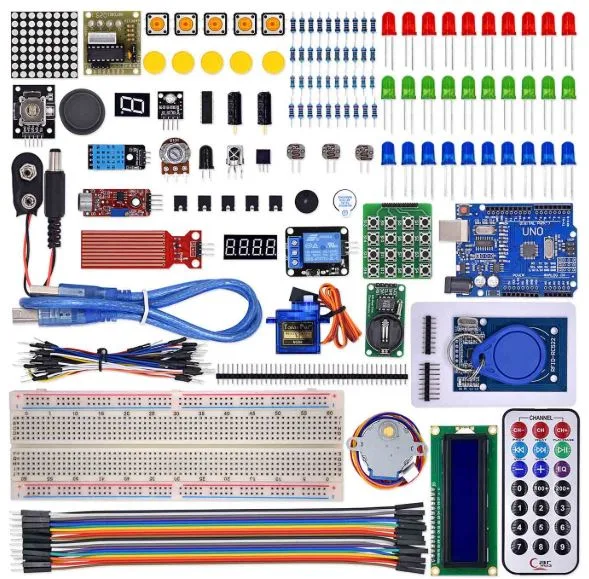
This kit includes an UNO R3 development board, an RFID module, and a wide range of sensors, modules, and components, so you can easily prototype and test complex projects.
Key Components:
-
UNO R3 Board (Arduino-compatible)
-
RFID RC522 Module with key fob and RFID card
-
Breadboard and jumper wires for fast prototyping
-
LEDs, resistors, and buzzers for visual and sound feedback
-
Servo motor, relay module, and other useful modules
-
I2C LCD screen, so you can display data from your projects
-
Cables, sensors, and more for endless possibilities
What You Can Learn and Build:
This starter kit allows you to learn both basic and advanced Arduino skills. It’s especially useful for projects involving security, automation, and identification.
Sample Projects:
-
RFID-based Door Lock System – Secure access with RFID cards
-
Attendance Tracker – Log entries using RFID tags
-
RFID + LCD Display – Show user info or messages when RFID is scanned
-
Alarm Systems – Trigger buzzers or relays when unauthorized tags are used
-
IoT Integration – Use Wi-Fi modules to upload RFID scans online
Because it includes many sensors and modules, you can go beyond RFID and build temperature monitors, light-controlled systems, and smart home automation prototypes too!
Why Choose This Kit?
-
Great for Arduino beginners and intermediate learners
-
Focused on RFID applications, but also includes general electronics
-
Compatible with Arduino IDE and works with many online tutorials
-
Offers real-world use cases, so learning feels practical and fun
How to Use the UNO R3 RFID Advanced Learning Starter Kit
Using this kit is straightforward — and it’s designed to help you learn both the basics of Arduino and more advanced RFID applications. Here’s a step-by-step guide:
Step 1: Set Up Your Development Environment
First, download and install the Arduino IDE from the official Arduino website.
This software lets you write, upload, and debug code for your UNO R3 board.
Step 2: Connect Your UNO R3 Board
-
Use the USB cable provided in the kit to connect your UNO R3 to your computer.
-
Then, open the Arduino IDE.
-
Go to Tools > Board and select Arduino UNO.
-
Choose the correct COM port under Tools > Port.
Step 3: Install Required Libraries
To work with the RFID module, you’ll need to install the following libraries:
You can install these from Arduino IDE > Library Manager.
Step 4: Connect the RFID Module
Wire the RC522 RFID module to the UNO as follows:
| RC522 Pin |
Arduino UNO Pin |
| SDA |
10 |
| SCK |
13 |
| MOSI |
11 |
| MISO |
12 |
| IRQ |
Not Connected |
| GND |
GND |
| RST |
9 |
| 3.3V |
3.3V |
Use 3.3V for the RC522. Do not connect to 5V.
Step 5: Upload Example Code
Use a sample sketch from the MFRC522 library like DumpInfo to read tag data:
Upload the code and open the Serial Monitor. When you scan a card or tag, the UID will appear.
you can watch this video which have kit looks like this one
Step 6: Build Projects
Now that your board and RFID module are working, you can build real-world projects, such as:
-
RFID Door Lock System using a relay and servo motor
-
Attendance Tracking System with timestamp and LCD display
-
Alarm System using buzzer and RFID authentication
-
Data Logger that stores or uploads scanned tag data to cloud
Tips:
-
Explore Arduino Project Hub for additional tutorials.
-
Mix and match with included modules like LEDs, relays, buzzers, or LCDs.
-
Experiment, because learning by doing is the best way to master electronics!


 Arduino Boards & Kits | Uno, Nano, Mega, Arduino starter kits
 BOM, ESP32 NodeMCU Advanced Development Kits, NodeMCU



There are no reviews yet.